


Matt loves great TV. I’d rather read.
He figured out how to keep watching it almost as soon as we started traveling full time.
He also spends a fair amount of effort finding shows he thinks I’ll actually like, and a lot of the time he succeeds, which is how I’ve ended up watching more television in apartments around the world than I ever did at home.
So this is his half of the house, written down, because it’s one of the things people ask us about most and because the answer is genuinely useful whether you watch one thing a week or four hours a night. If you’re the Matt in your house, this is for you.
Why your shows vanish when you land
You land somewhere lovely, you open the TV app you pay for every month, and it isn’t the same app anymore.
Some of it’s missing. Some of it’s in another language. Sometimes the whole thing refuses to play at all.
Nothing is broken and nobody has cancelled your account. Streaming services license content country by country, so what they’re allowed to show you depends on where they think you are, and they work that out from your internet connection. Land in another country and you get that country’s version.
It’s the service doing exactly what its international liscensing agreements say it has to.
The fix, as simply as I can put it
A VPN, which stands for virtual private network, is a private tunnel between your device and the internet.
The useful part for this is that the tunnel can come out somewhere else. If we’re in Thailand, Matt sets ours to come out in the United States. The streaming service looks at the connection, sees a US one, and gives him what he’d get at home.
That’s the whole trick. It isn’t clever and it isn’t a workaround anybody has to feel funny about. It’s a setting.
We use NordVPN. Matt uses it for this, and I use it for the far less entertaining reason that I don’t much like doing my work on a hotel network. It runs on our laptops and on both our phones.
But there is a caveat. Using a VPN this way is perfectly legal, but streaming services don’t always like it, so they actively look for VPN connections and block the ones they find. That means any VPN works until it doesn’t, and the honest way to describe it is that a good one gets blocked less often and fixes it faster. If a show won’t play, switching to a different US city in the app usually sorts it in a few seconds. If it never works at all, that’s a service that’s clamped down hard, and no VPN is going to promise you otherwise.
Watching it on an actual screen
Watching a TV show or film on a laptop or a phone propped on a pillow is fine once in a while. Call me old fashioned, but I like to watch TV…on a TV.
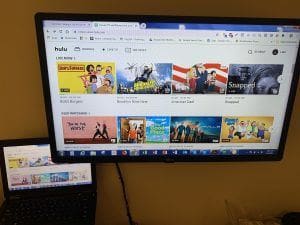
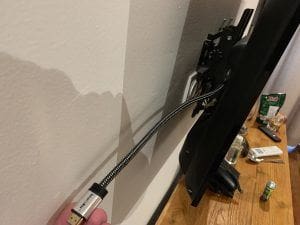
Most apartments and a lot of hotel rooms have a television with an HDMI socket on the back, and the simplest thing in the world is to plug your laptop into it with a short HDMI cable. Your laptop becomes the source, the television becomes the screen, and nothing on the hotel’s system is involved at all. Matt carries one permanently and it weighs nothing.
The other option is a streaming stick, but it’s worth knowing what you’re getting into. They’re brilliant at home. Traveling, they can be fussy: they know where they are, they sometimes want to reconfigure themselves for the country they’ve landed in, and getting one onto a hotel network that makes you accept terms on a web page can be genuinely annoying. If you want one, take it. Just take the cable too.
The room’s own smart TV is fine to use, and we do sign into ours sometimes. On a longer stay it’s worth the two minutes, and in the States it’s usually just easier than plugging anything in. The tradeoff is the VPN outside your home country, because most televisions won’t run one, so signing into the TV means giving that up.
Which sometimes matters less than you’d think, because there’s a way around it. A show that’s on one service at home is often licensed to a different one where you are, so the local version of an app sometimes has something the American one doesn’t. We’ve sat in Italy and watched a show on the apartment’s television that we’d have needed a different subscription for back home.
So before you decide something’s gone, google the show’s name along with the country you’re actually in and see which service has it there. Sometimes it’s one you already pay for and you don’t need the VPN at all. Sometimes it’s a service you don’t have, and then you’re back to the laptop and the cable.
The habit that goes with using a smart TV is signing out of the service(s) when you pack.
And if you forget, you’re not stuck. Every major service has a page in your account settings that lists the devices you’re signed into and lets you remove one, or sign out of all of them at once. You can do it from anywhere. Worth finding that page once before you need it.
Which services, and why I’m not giving you a list
The original version of this article listed the four services Matt paid for at the time. Every one of those has since changed its name, its owner, its price or all three.
So his general advice instead: find out what platform the shows you want to watch are on and subscribe to those. Matt is loyal to shows, not platforms. And if a show drops on a platform he’ll subscribe, watch the show, then cancel his subscription. It takes a little work, but avoids paying for streaming services he’s not watching.
Two we do keep, and both are worth naming because they earn their place differently:
Amazon Prime Video. If you’re already a Prime member for the shipping, a lot of content comes with it, and you can rent or buy things outright and download them. That last part matters more than people expect, and it’s the next section.
Paramount+. Matt’s for the sports as much as anything, and it’s one of the few services where being able to watch live from another country is the entire point.
The rest changes too fast for me to be useful about, and any article that tells you otherwise was written a while ago.
Download before you fly, every time
The single best habit on this page, and it costs nothing.
Many major services lets you download shows and movies to your phone, tablet, or laptop on wifi and watch it later with no connection at all. Do it the night before, while you’re on the apartment’s wifi and your bag is already packed.
Plane wifi is a coin flip and usually a slow one. Train wifi across Europe ranges from excellent to entirely theoretical. Downloading is the only version of this that always works, and it turns a nine-hour flight into something you look forward to slightly more than you did.
The four things that make watching on a plane bearable
This is where my travel comfort kit list actually earns its keep, and all four fit in a personal item.
A Bluetooth audio transmitter. Plugs into the seat-back screen and pairs with your own headphones, so you’re not using the free airline earbuds. The one we carry is the Twelve South AirFly SE. The limit worth knowing before you buy: older aircraft have a two-hole seat jack and a single-plug transmitter won’t seat properly in one, which is a thing a reader wrote in about after it happened to her. A two-prong airline adapter solves it and costs almost nothing, so carry both.
A phone stand. Props the phone up on the tray table so you’re not holding it for two hours or balancing it against a cup.
A power bank. Streaming is the fastest way to flatten a phone there is. Ours charges a phone twice over and has the cables built in, so there’s nothing to hunt for. A 3-in-1 charging cord covers everything else between us.
Wax earplugs, for the half of the flight when you’d rather sleep than watch anything.
Noise-canceling headphones are the obvious fifth and we wouldn’t travel without ours.
One thing to watch if you’re streaming on cellular data
If you’re using a travel eSIM rather than wifi, be careful here, because video will go through a data plan faster than anything else you do.
A country plan sized for maps and messages will not survive a film. If you know you’ll be watching on the move, either buy more data than you think you need or use a plan built for it. Airalo is what we use for a normal trip. Pangea is the one for a month at a time or for genuinely heavy use, which streaming absolutely is, because it includes unlimited data. There’s more on eSIMs here if you haven’t used one.
On wifi, none of this applies. Watch away.
The other half of why we have a VPN
Everything above is Matt’s reason. Mine is duller and it’s the one I’d argue is more important.
A VPN doesn’t only change where your connection appears to come from. It also means the network you’re sitting on can’t watch where you go, which matters more in a hotel than most people realize, and it’s why I won’t do anything to do with work on an open network without one.
There’s a whole other question underneath that, which is whether public wifi is actually dangerous in the first place. The honest answer surprised me, and it isn’t the one you’ve been told for twenty years.
Do you need a VPN for travel? is where I’ve written that up, with what the FTC and the FBI actually say about it, and what to do that costs nothing.
Same subscription. Two completely different reasons.
The bottom line
Your shows disappear abroad because of licensing, not because anything is broken. A VPN puts them back, it works until a service blocks it and then you switch cities and carry on, and you set it up at home rather than in an airport.
Download before you fly. Carry a short HDMI cable and use the room’s television as a screen rather than as a computer. And if you’re watching on cellular data, buy more of it than you think you need.
Matt does all of this so he can watch things I mostly don’t want to watch, and then finds me something I do. It’s a reasonable trade.
Frequently asked questions
Is using a VPN to watch my own subscriptions allowed? You’re paying for the service either way. It’s against most services’ terms rather than against the law, and what they do about it is block the connection, not come after you. Decide how you feel about that with the actual facts rather than the scary version.
Why does my show work one day and not the next? The service found and blocked the VPN address you were using. Switch to a different US city inside the VPN app and try again. It usually takes seconds.
Do I need a VPN on the television, or just the laptop? Just the device that’s playing. If your laptop is the source and the TV is only a screen, the VPN on the laptop is all you need, which is one reason we prefer the cable to a streaming stick.
Will a VPN slow everything down? A little, because your traffic is taking a longer route. On a decent connection you won’t notice it for video. On bad apartment wifi you might, and the fix is usually a closer server rather than turning it off.
What if I only want this for a two-week trip? Then take the monthly option rather than the annual one, and set it up before you go so you’re not troubleshooting on holiday.
Can I share one subscription across our devices? Every reputable VPN covers several devices on one account. Ours runs on both laptops and both phones.
Is it worth taking a tablet just for watching? If you download before you fly, a phone and a stand does the job and weighs nothing. A tablet is nicer and it’s another thing to carry, charge and not lose.
What about the apartment’s own smart TV? We use them, especially on longer stays. Sign out when you pack, and if you forget, your account settings let you remove that device remotely from your phone.
Subscribe to my newsletter!
I send one email a week to 21,000 subscribers. Real stories, what worked, what didn’t, and the practical things I only figure out by doing them. Plus my free packing guide and international travel checklist when you sign up.



1 comment
While VPN will keep you safe from the local wireless sniffer or ISP (but so does SSL connections), it does not keep your traffic encrypted past the VPN provider. In fact you send all your traffic to your VPN provider so they can see all your traffic as they decrypt it as they let you pop out in Atlanta or wherever you choose. Wonder what they do with your data to make up for not getting a yearly fee from you. As for pretending to be in the US..VPN is a perfect solution but it is not really a security thing unless you are only using Services located within the VPN provider’s network.