

Two readers wrote in this summer with opposite versions of the same question.
One is in her seventies, heading to Iceland. She’d looked at the eSIM page I recommend and couldn’t work out what she was supposed to be buying. Do you buy it for the country you’re going to, or the country you live in? And she asked something I thought was genuinely smart: is this thing going to embed itself in my phone and track where I go?
The other hasn’t been overseas in ten years, travels with a wifi-only iPad, and wanted to know whether she’d have service on planes and trains.
Nobody explains this well. So let me try, and let me do it without a single piece of jargon I don’t immediately translate.
One thing before we start, because a good chunk of you aren’t in the United States: none of this depends on where you live.
A travel eSIM plan is bought online with a card, from anywhere, and it has nothing to do with your home carrier or your home country. The advice below is the same whether you’re reading this in Ohio, Ontario, Yorkshire or Queensland. The only thing your home country changes is what you’re comparing the price against, and I’ve covered that below too.
First, check what you already have
Before you buy anything, look at your current phone plan.
Some plans include a bit of free international data, and if yours does, you may not need anything else for a short trip.
Two honest caveats, though. Plenty of other plans charge a small fortune the moment you use them overseas, so check rather than assume. And the free international data that is included is almost always throttled, which means deliberately slowed down. It’s fine for maps and messages. It is not the speed you’re used to at home.
What you’re checking for depends on where you live, so here’s the short version for each.
In the US, most carriers sell a day pass, where you pay a flat fee for each day you use your phone abroad. Work out the daily rate, multiply it by the length of your trip, and compare that one number to the cost of a whole travel eSIM plan. That single sum is usually the entire decision.
In the UK, this is the one that’s changed. Before Brexit, EU roaming was included and nobody thought about it. Since January 2021 there’s been no legal requirement for UK operators to offer it free, and they’ve gone in different directions: some networks still include Europe, some charge a daily fee, and it often depends on your specific plan and when you signed up. So check yours rather than assuming it works the way it did on your last trip. And if you’re going anywhere outside Europe, the answer is much simpler, because you’re almost certainly paying either way.
In Canada and Australia, the day pass is the usual model too, so it’s the same arithmetic as the US: daily rate times days, against the price of one plan. Australians, your trips tend to be longer than most, which pushes the maths further toward an eSIM than it does for a week in Lisbon.
And if you live in the EU, you already have this solved inside Europe. Roam like at home covers the whole European Economic Area, which is the 27 EU countries plus Iceland, Liechtenstein and Norway, and the current rules run to 2032. Save your money until you leave the bloc.
I know how the roaming version goes, because it’s how we started.
When Matt and I first went full time, we thought data would never be a problem. We’d traveled for years on a T-Mobile plan with unlimited international roaming, and it had always been fine.
Then we actually lived on it. It was slow enough that Google Maps often wouldn’t load, so Matt was constantly downloading offline maps before we went anywhere. And about five months into nomading around Asia and Australia, he got a text from T-Mobile telling him his international roaming was going to be switched off.
He went and read the terms. Stay over roughly half your usage on international roaming for long enough, and they warn you. Don’t change it, and they turn it off.
Unlimited, it turns out, has an asterisk.
What a travel eSIM actually is
A SIM card is the little chip inside your phone that connects it to a cell network.
An eSIM is that same thing with the plastic removed. Built in digitally, instead of a chip you pop in and out.
That’s the whole idea. It isn’t new technology, it’s the same technology with the physical part taken away.
Think of it as a second, separate data plan sitting alongside your regular one, switched on only for the country or region you’re visiting. Your normal plan stays exactly where it is.
Here’s the part nobody says out loud: this is about data, not phone calls
A travel eSIM buys you internet. It doesn’t give you a local phone number, and it isn’t how you’ll be making calls.
That’s fine, because data is what you actually need out there. Maps. Rideshares. Translation. Restaurant bookings. Boarding passes. Photos to the group chat.
When you want to talk to someone, you do it over that data with WhatsApp, FaceTime or a normal video call, the same way you already talk to people at home.
If you take one thing from this article, take that. Almost everyone who’s confused about eSIMs is confused because they’re picturing a phone line, and it isn’t one.
Buy it for where you’re going, not where you live
This trips up almost everyone, and it’s the question that came in from Iceland.
You buy the plan for your destination.
Whether you live in Phoenix, Sydney, Manchester or Calgary, flying to Portugal means you buy a Portugal plan, or a Europe plan. Not a US one, not an Australian one, not a British or Canadian one. The eSIM’s whole job is to connect you to networks in the country you’ve landed in, so it has to match your destination and nothing else.
Your own country genuinely doesn’t come into it. You buy the same Portugal plan wherever you’re flying from.
No, it isn’t tracking you
This deserves a straight answer, because it’s a fair thing to wonder and nobody addresses it.
An eSIM isn’t a new piece of tracking technology. It’s the exact same SIM technology phones have used for decades, just built in digitally instead of slotted in.
Anything that can find a phone’s location does it because the phone is connected to a cell network at all. That’s every bit as true of your regular plan back home. The eSIM doesn’t add a thing.
One related surprise worth knowing about in advance, so it doesn’t alarm you: when you sign up, you may be asked for passport information. We were, and we didn’t love it either until we looked into why.
It’s because a number of countries have Know Your Customer rules, which is the same reason you sometimes have to show a passport to buy a local SIM card in a shop. The eSIM companies handle it digitally instead.
There’s an upside to that which I’ve come to appreciate. It means there are no photocopies of my passport sitting in a drawer behind the counter of a phone shop in a country I’ve long since left.
Your own number, and the two-factor problem
This is the part I care most about, because it’s where the old way genuinely hurt us.
Before eSIMs, using a local SIM card meant physically taking your home SIM out. Most phones only have one slot. So you’d lose calls and texts to your own number for the whole trip.
Including your two-factor authentication codes. The ones your bank sends you.
That is not a small inconvenience when you’re a long way from home and something needs verifying.
Matt and I built a workaround, and it tells you how bad the problem was. He moved all his two-factor codes over to my phone number, put a local SIM in his phone, and then I tethered to his hotspot whenever we weren’t on wifi. That way we shared his cheap local data, and I could still receive the texts.
It worked. It was also a genuine pain. I lost his hotspot constantly, so we were forever reconnecting, and if he wandered too far off I’d lose signal altogether.
Here’s what an eSIM does instead, and it’s the reason we switched and never went back.
Your phone runs both at once. Your home SIM stays exactly where it is, and the eSIM sits alongside it. You choose which one handles data.
So the setup is: cellular data on the eSIM, voice line on your home number. Cheap travel data, and your bank codes still arrive.
A reader asked us a follow-up question about this that deserves a proper answer, because it’s the thing people worry about next: if you leave your home line switched on for calls and texts, does your carrier bill you?
The expensive part of roaming is data, and you switch that off on your home line, which is the single most important setting in this whole article. Incoming texts are usually free. Calls can still be billed at roaming rates depending on your carrier and plan, so don’t sit and chat casually on your home number, and don’t assume. Check what your specific plan does before you go, and use WhatsApp or FaceTime over the eSIM data for actual conversations.
Which one to buy depends on how you travel
We use two travel eSIM providers, and they do genuinely different jobs. Buying the wrong one for your trip is the main way people overpay.
A week or two in one country or region. You pick your destination, buy the plan, and that’s it.
Ours usually runs around nine dollars, which is generally less than a single day of carrier roaming. (Our typical country plan as of August 2026. Prices move, so look before you buy.)
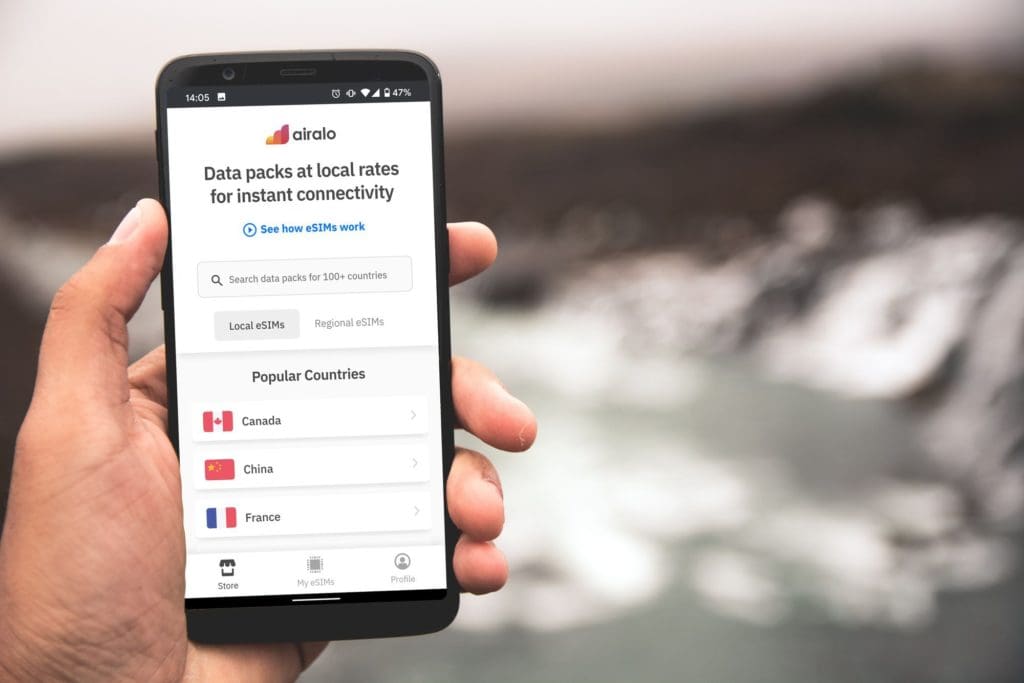
Airalo covers over 190 countries and regions, so a single-country plan works if you’re staying put and a regional plan works if you’re moving around. You can also see exactly how much data you have left in the app, which you never can with a local SIM bought at a kiosk.
This is the one most people reading this want.
For long or back-to-back travel: Pangea
Unlimited monthly data across 105 countries, so there’s nothing to re-buy every time you cross a border.
That’s the right answer if you’re living out of a suitcase for months or hopping countries constantly. It’s the wrong answer, and more expensive than you need, for two weeks in Portugal.
Short trip, Airalo. Living out of a suitcase, Pangea.
Setting it up is easier than it sounds
You don’t have to be a tech person.
Do it at home, on your own wifi, before you leave. You scan a QR code, follow the instructions, and switch it on the moment you land. The QR code link walks you through it step by step and it takes about two minutes.
It took us about ten minutes the very first time, and that included working out how to switch between the two lines in our phone settings. Every one after that has taken seconds.
Two things worth knowing before you start.
Check your phone supports eSIM. Almost anything from the last few years does. On the Apple side that means an iPhone XS, XS Max, XR or newer, which is 2018 onward. Most recent Android phones handle it too. (Verified against Apple’s own support documentation, August 2026.)
Get the roaming setting right, because this is where people get stuck. Turn data roaming off on your home SIM, and on for the eSIM. Off on the eSIM and it may not connect at all. Off on your home line is what stops your own carrier quietly billing you while the eSIM does the work.
And if you get stuck, here’s my own approach, offered without shame: I ask my niece or nephew. Kids are unreasonably good at this, and there’s no prize for figuring it out alone.
Wifi and cell service are not the same thing
This is the one that catches people out, and it was the second reader’s question.
Wifi is a network inside a building, a plane, or a train. Cellular is the towers outside.
An eSIM gives you cellular. It cannot give you wifi.
Which means a wifi-only iPad has no cellular hardware at all, so no eSIM can help it. If a tablet doesn’t have a cellular version, it will only ever work on wifi, and there’s nothing to buy that changes that.
Plane wifi is something the airline sells you separately, and it’s a coin flip whether it’ll be any good. Train wifi across Europe ranges from excellent to entirely theoretical.
Plan for no service and be pleasantly surprised.
Before you go anywhere on it
Being online is the first half of being able to handle something going wrong. It isn’t the whole thing.
Data doesn’t tell you who to call when your bag goes missing, what you should have photographed and saved before you left, or what to actually do in the first ten minutes after something happens to you in a city you don’t know.
That’s what I wrote The Smart Woman’s Guide to Safer Travel for. It’s everything I actually do to feel safe and sure of myself out in the world, walked through every phase of a trip, with the checklists I use myself.
Get the data sorted first. Then sort the rest.
The bottom line
Travel eSIMs have removed more friction from my travel than any other single thing. I’m online the second the plane doors open, and I’ve never once queued at an airport phone shop.
Three things to remember, and you can forget everything else.
Buy it for where you’re going, not where you live. It’s data, not a phone line. Cellular data on the eSIM, voice on your home number, and data roaming off on your home line.
That’s the whole thing.
Grab an Airalo plan for your next trip, or get unlimited monthly data with Pangea if you’re going to be out there a while.
Frequently asked questions
Do I buy a travel eSIM for my home country or the country I’m visiting? The country you’re visiting. If you live in Chicago and you’re going to Italy, you buy an Italy plan or a Europe plan. The eSIM connects you to networks where you land, so it has to match your destination.
Will an eSIM track me? No more than the phone in your pocket already does. It’s the same SIM technology phones have used for decades, just built in digitally rather than slotted in. Anything that can locate a phone does it because the phone is on a cell network at all, which is equally true of your normal plan at home.
Do I lose my own phone number? No. Your home SIM stays in your phone and your number stays active. You set the eSIM to handle data and leave your home line for calls and texts, which is how your two-factor authentication codes still reach you.
Will my carrier charge me if I leave my home line switched on? Turning data roaming off on your home line is what prevents the expensive part. Incoming texts are usually free. Calls can still be billed at roaming rates depending on your carrier and your plan, so check yours before you travel and use WhatsApp or FaceTime over your eSIM data for real conversations.
Will my phone even work with this? Almost certainly, if it’s from the last few years. iPhone XS, XS Max, XR or newer, and most recent Android phones. If your phone is older than about 2018, check before you buy anything.
Will I have service on the plane or the train? Not from an eSIM. That’s wifi, which is a completely separate thing that the airline or rail company sells or provides, and its quality is a lottery. An eSIM connects to cell towers, and there aren’t any at 35,000 feet. Plan for no service and treat it as a bonus when you get it.
Can I use one on my iPad? Only if it’s a cellular model. A wifi-only tablet has no cellular hardware inside it, so there’s nothing for an eSIM to connect to. Check which version you own before you buy a plan for it.
I’m not in the US. Does any of this apply to me? All of it. Travel eSIM plans are bought online with a card and aren’t tied to your home carrier or your home country, so a reader in Vancouver, Leeds or Brisbane buys exactly the same plan as a reader in Chicago. The only thing that differs is what you’re comparing the price against: a day pass if you’re in the US, Canada or Australia, and something that varies quite a bit by network if you’re in the UK, where free EU roaming stopped being a legal requirement after Brexit. If you live in the EU, you already have Europe covered and only need this once you leave it.
Subscribe to my newsletter!
I send one email a week to 21,000 subscribers. Real stories, what worked, what didn’t, and the practical things I only figure out by doing them. Plus my free packing guide and international travel checklist when you sign up.



6 comments
I’m traveling abroad for long periods of time and got the exact same text from T-Mobile! This seems like a brilliant workaround – just to confirm, even if you use your primary number for voice calls and texting, T-Mobile won’t turn off your international roaming? As long as you use your eSIM for cellular data/hotspot and have Data Roaming on your primary line turned off? I just want to ensure my settings are correct (I purchased my eSIM from Airalo). If international voice/texting is also an issue for T-Mobile, I can just ensure I’m on wifi for those, correct? Thank you so much for this article..super helpful and relevant for me!