


A big part of what makes full-time travel possible for us is knowing how to search properly for a flight.
Matt and I have used Google Flights to find cheap tickets on more than ten airlines in business class, and on a dozen more in economy and premium economy.
Same tool, same techniques, whichever end of the plane you’re sitting in.
This is the step-by-step version, and with a few small changes to how you search you can save hundreds on your next flight.
What Google Flights actually is
Google Flights is a flight search engine. It’s Google, so of course it’s a powerful search engine.
The one thing to understand before you start: you can’t buy a ticket on Google Flights. It searches, then hands you off to book either directly with the airline or through a third-party site like Orbitz or Kayak. Which of those two you pick matters more than people think, and I’ll come back to it.
To start, go to google.com/travel/flights. Like most Google things, the home page looks far simpler than it is.
There are three ways to search, and they’re really three levels of flexibility. The more flexible you can be, the cheaper it gets.
Search one: you know where and when
This is the ordinary search, the one that works like every other travel site. Departure city, destination city, your dates.
One thing to do differently, and it’s the highest-value habit in this whole article: search the city, not the airport.
Type New York, not JFK. Type London, not Heathrow. Google will then find the cheapest combination of airports across both cities. Limiting your search to one airport shrinks your options and usually raises the price.
Even flying out of a smaller airport an hour away can save you hundreds. And sometimes even time.
Above the city boxes are three dropdowns: round trip or one way, how many passengers, and class of service. For the example, we’ll look at a one-week round trip for two from New York to London in business class, departing February 11 and returning February 18.
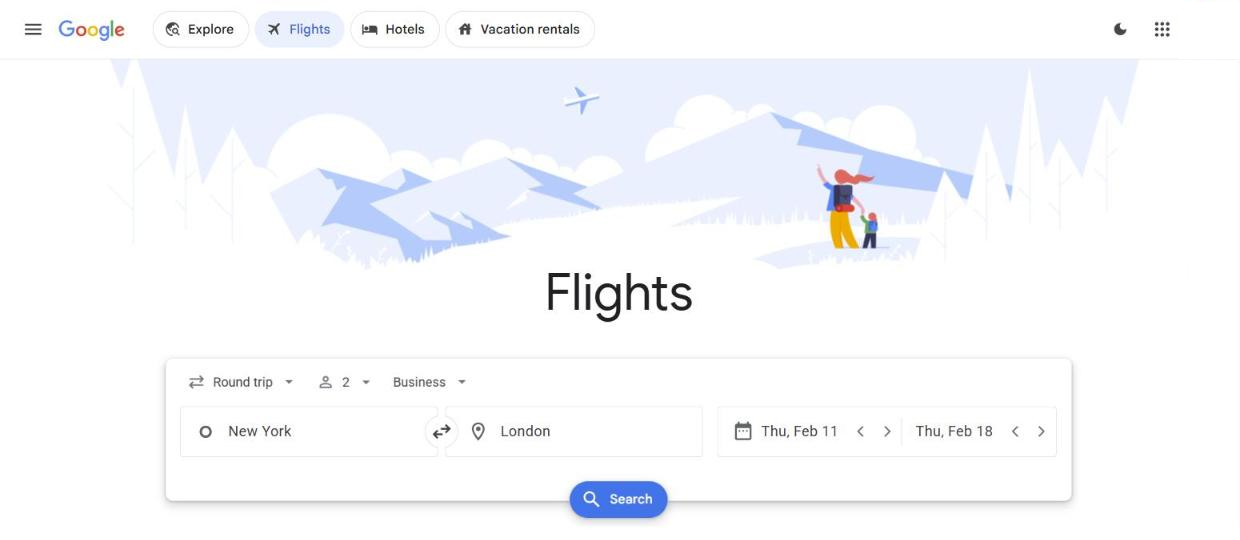
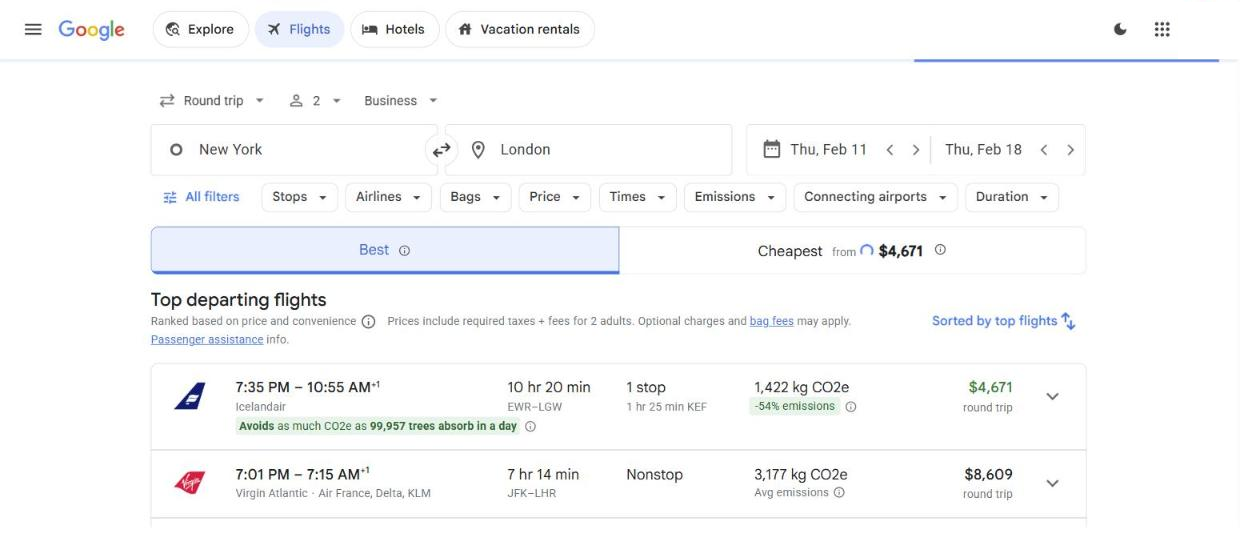
Hit Search and you’ll get departing flights, sorted into Best and Cheapest. Click the arrow at the right of any flight to see details, then Select.
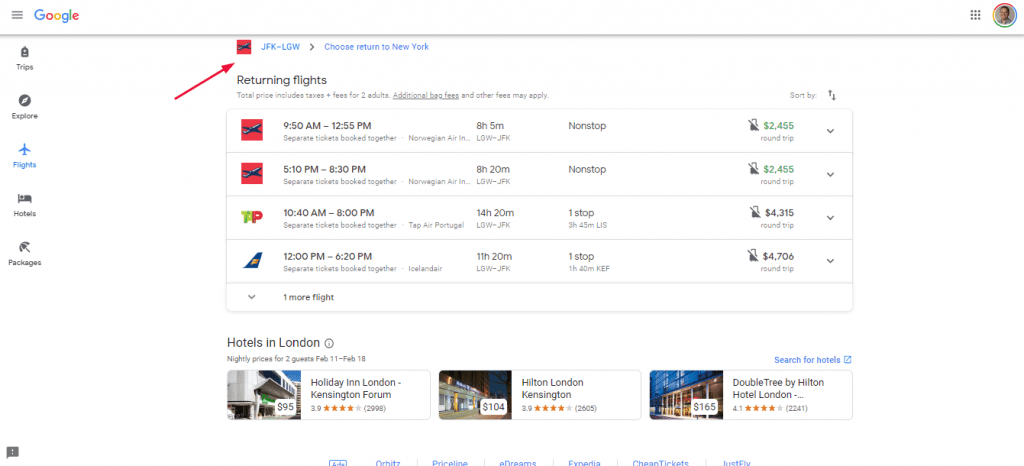
Google then shows return flights with your outbound at the top, and you do the same again.
Then you land on the Ready to Buy page with everything laid out, and a Select button that hands you off to whoever is actually selling the ticket.
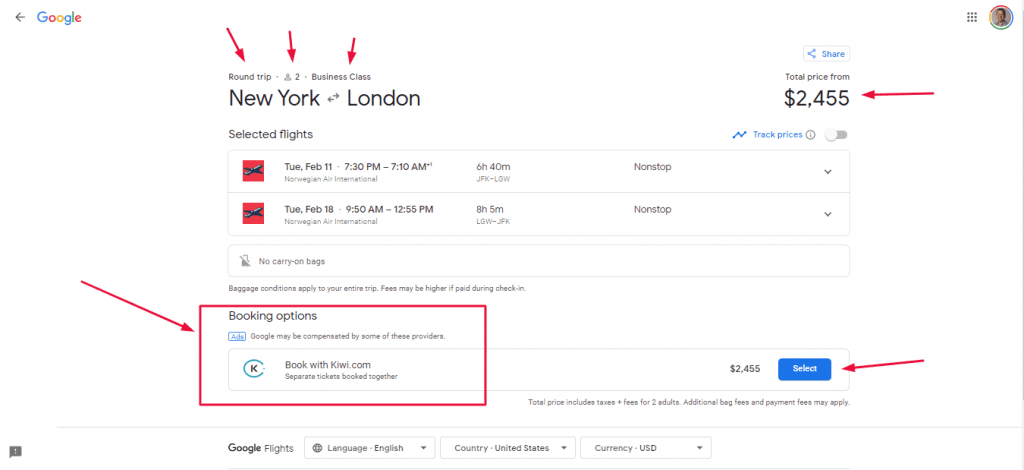
Always do your research on what you’re actually buying, though. Business class isn’t a standard product. Icelandair’s Saga Premium, for example, is a wide recliner rather than the lie-flat bed most people picture when they hear the words Business Class. That may or may not matter to you. But the price alone won’t tell you which one you’re getting.
Search two: you know where, but not exactly when
Timing is everything, and there’s no hard and fast rule about which day, month or season is cheapest.
Fares are so elastic now that one day’s ticket might cost two or three times more than tomorrow’s on the same route. So if you can be flexible on dates, you significantly improve your chances.
Run your search as normal. Then, on the results page, scroll past the first block of flights. You’ll find a row with Track prices on the left and Date grid and Price graph on the right. That’s the one you want.
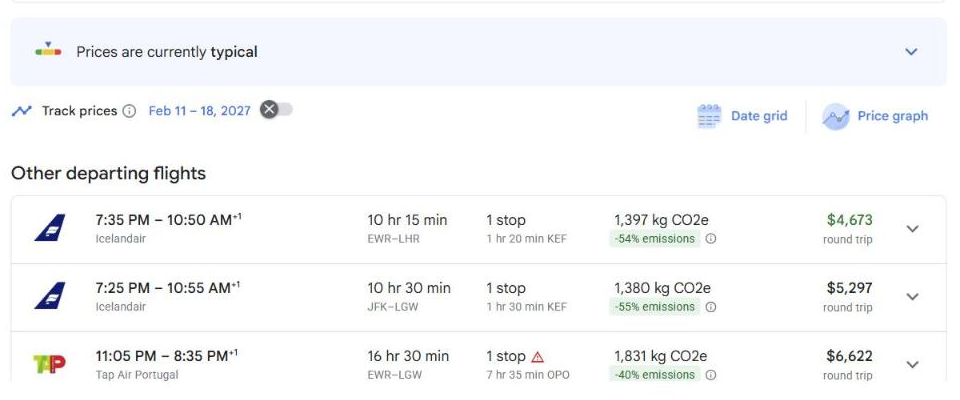
The grid shows what happens to your fare if you shift your departure or return. Google colors expensive combinations red and cheap ones green, so the pattern jumps out before you’ve read a number. Use the arrows next to Departure and Return to move further from your ideal dates.
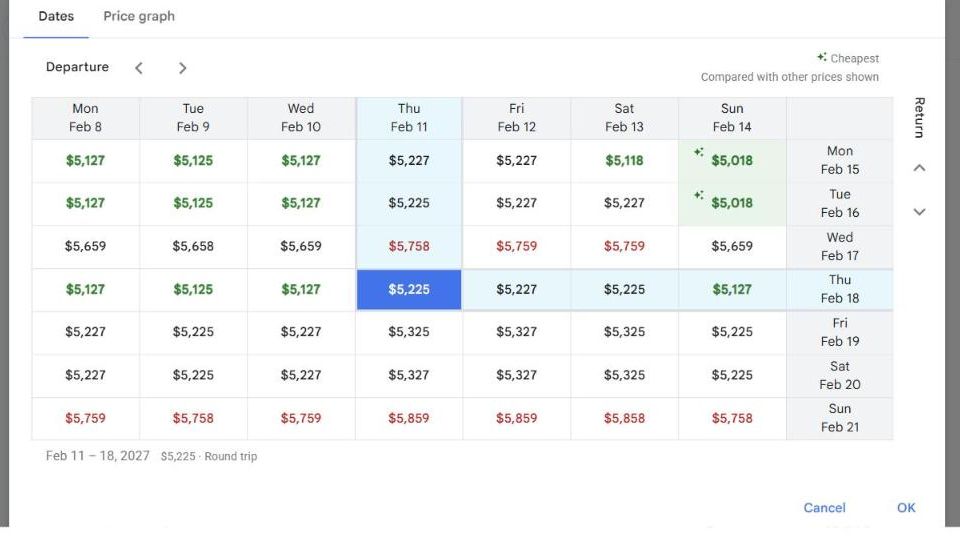
Look at the spread on that one. Same route, same week, and the price moves more than eight hundred dollars depending on which two days you pick. We’ve had this grid show fares that were thousands cheaper based on dates.
When you find a combination you like, click it, close the grid, and the new dates load into your search with the new price.
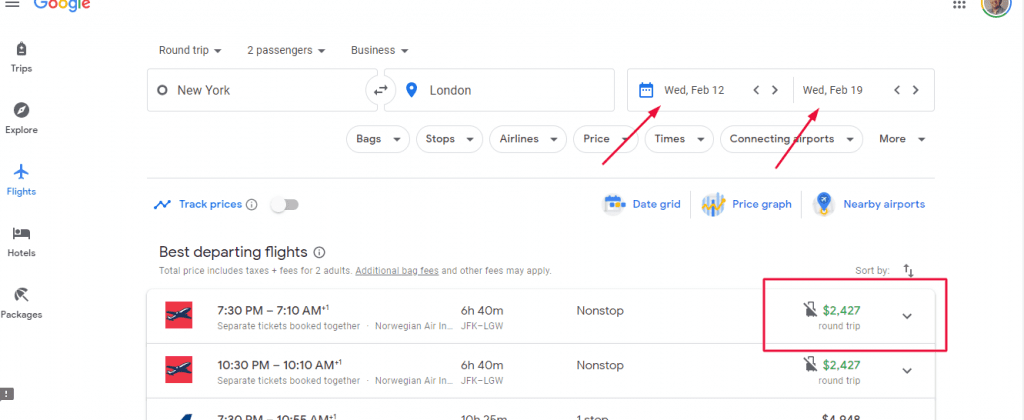
Sometimes the grid moves the price by nine dollars and you ignore it. Sometimes it moves it by nine hundred and you rearrange the whole trip. You won’t know which until you look.
Which is why you check prices before you commit to dates, not after. Most people choose dates first, usually around time off or a hotel deal, then hunt for a flight to match. That’s backwards. Find the cheap window, then build the trip around it.
Search three: you’re flexible on everything
This is our favorite feature and we call it the Dream Machine.
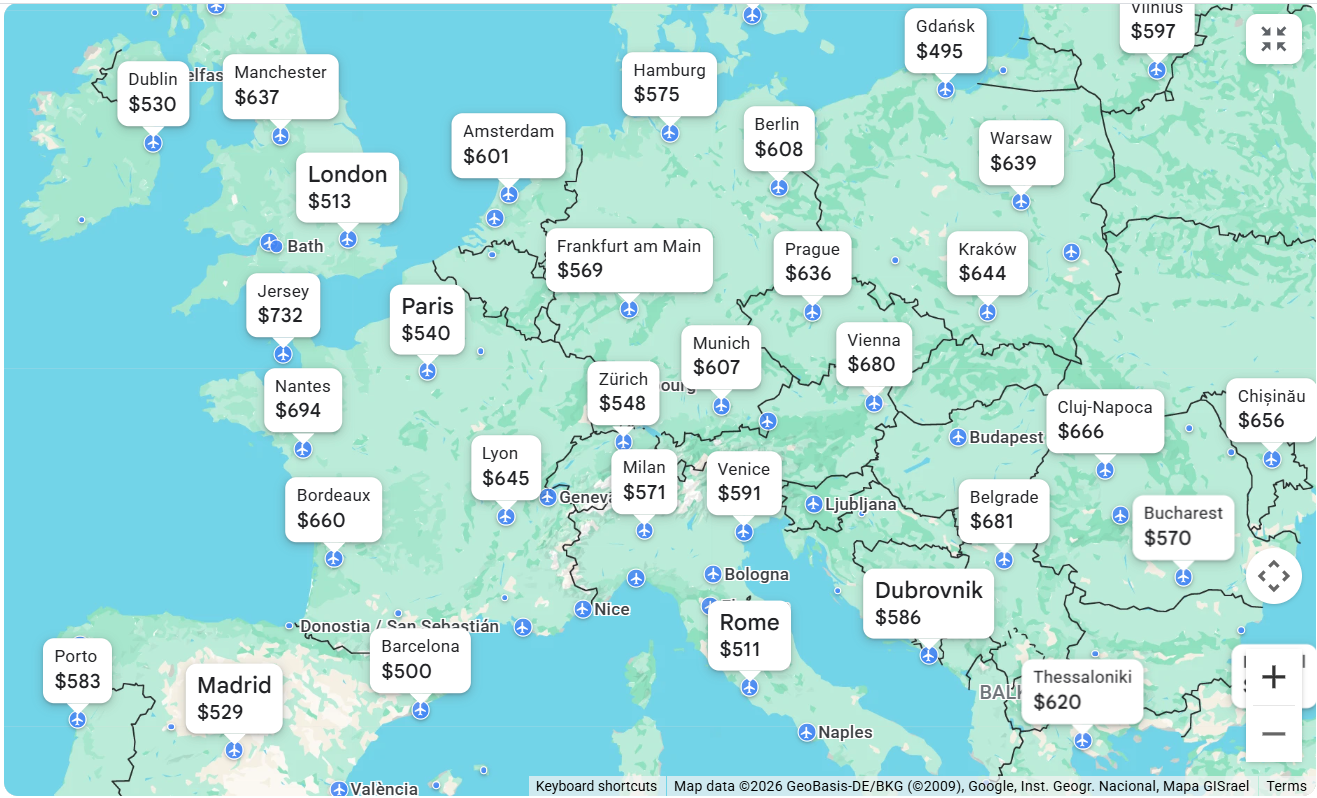
If your dates and your destination are both open, the open map search shows you cheap fares to anywhere in the world, on a map, at a glance.
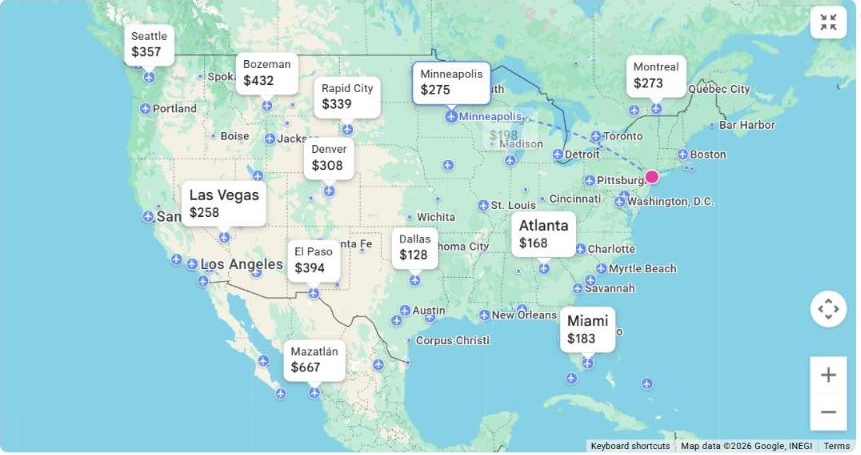
Put in your departure city, leave the destination blank, and Google fills in a default trip length and window that you can change. Zoom with the plus and minus controls, drag the map around like any Google map, and the fares move with you.
Say you don’t care where in Europe you go, you just want to go to Europe. Drag the map over and the fares come with it. The cheapest ones also stack up in the list down the left side, so you can read it either way.
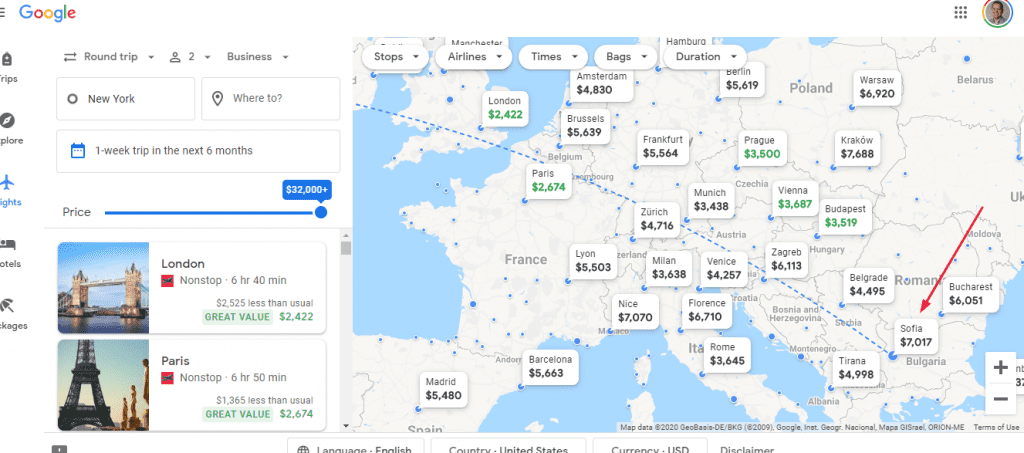
Want a city that isn’t showing a price? Hover your pointer over it and the fare appears. When we checked Sofia, Bulgaria that way, the business class fare turned out to be expensive, so the workaround was obvious: fly into London on a cheap fare and take a budget flight onward from there.
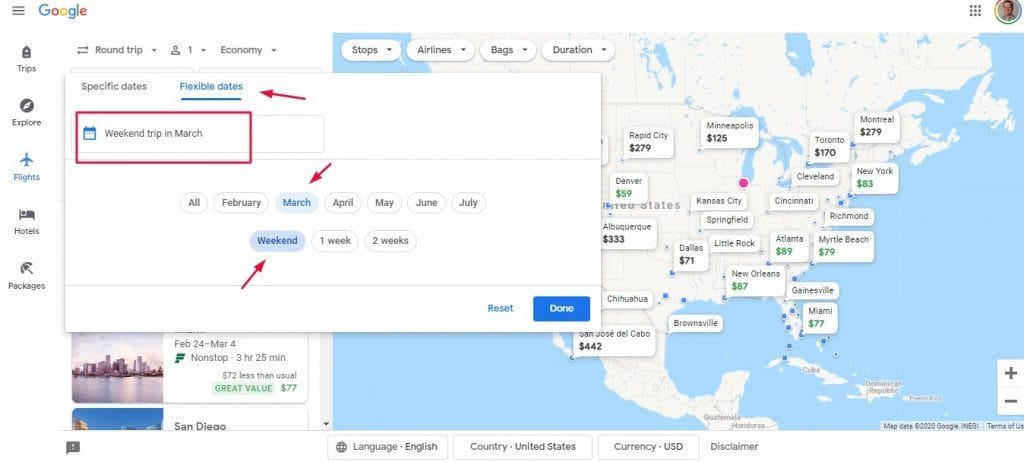
And if nothing looks good, change the parameters instead of giving up. Click the date box, reset it, go to flexible dates and play with them. The whole map redraws.
What this looks like when it’s a real trip
My girlfriends from Notre Dame and I try to get together for a girls weekend once a year. With us traveling full time and their careers and kids and life, it gets harder every year.
One year I was bound and determined to make it happen. They all live in Chicago, and once we’d agreed on a weekend in March and “somewhere warmer than Chicago,” that was the entire brief. No destination. Just warmer.
So I went to the open map search, entered Chicago as the departure, left the destination blank, and left it on round trip, one passenger, economy. Then I clicked the date box and chose Weekend Trip and March.
Based on the fares, the choice came down to New Orleans or Atlanta. We picked Atlanta, because the point of the weekend was spending time together rather than partying on Bourbon Street, and the fare was $97 round trip.
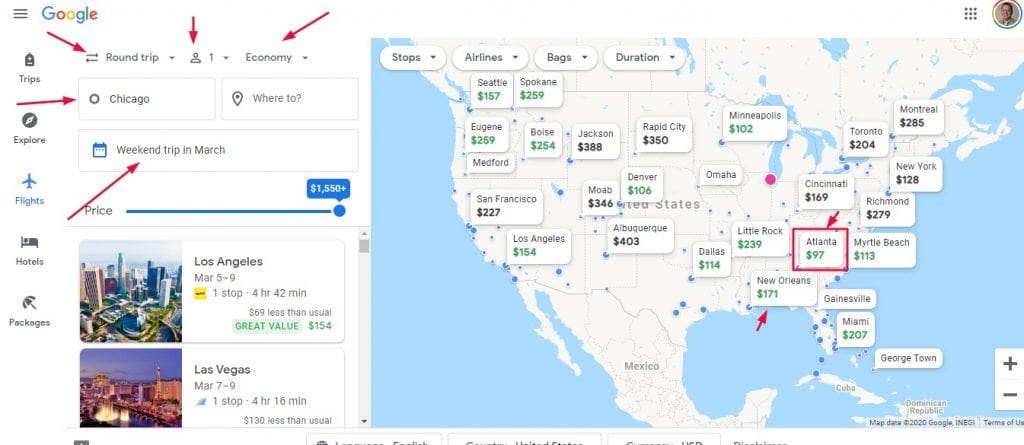
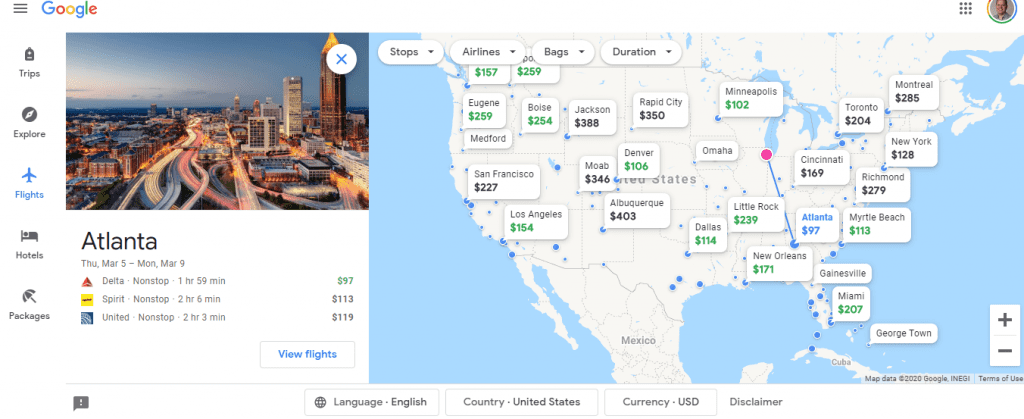
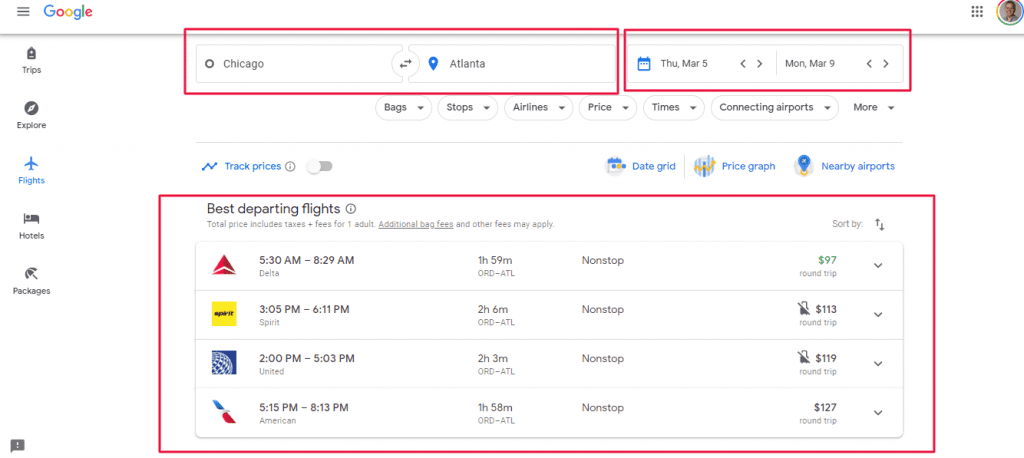
Ninety-seven dollars, with a wide choice of airlines and schedules on top of it. That’s how the open map search makes a girls weekend actually happen.
Notice that this one is economy and domestic. Everything above works exactly the same whether you’re flying to Atlanta for a weekend or to Asia in a lie-flat seat.
Two more habits that save real money
Book with the airline, not the middleman. Expedia, Orbitz and Kayak look convenient right up until something goes wrong. When there’s a delay, a cancellation or a rebooking, the airline will usually tell you to contact your travel agent, and that means waiting on hold with a third-party service that may or may not help you. Use Google Flights to search and compare, then go directly to the airline’s website to book. You get more control, easier check-ins and better access to customer service if anything changes. It’s worth the extra sixty seconds.
Stop assuming round trip is cheaper. That used to be the golden rule and it isn’t anymore, especially if you’re flying into one city and out of another. Search one-way flights separately. Try open-jaw itineraries, like flying into Paris and out of Rome. Sometimes two one-way tickets, even on different airlines, save you money and give you better flight times.
And turn on price tracking before you book. It’s the toggle next to Track prices, in that same row as the date grid. Google Flights will watch your route and dates and email you when the price drops. This one feature alone has saved us hundreds of dollars over the years.
Book it, then do one thing right away
The moment you buy that flight, a clock starts that most people don’t know about.
If anyone on the trip has a health condition of any kind, travel insurance can cover it, but only if you buy the policy within days of your first trip payment. And for almost everyone, that first payment is the flight you just booked. One of the two companies I compare gives you seven days. Not seven days before you fly. Seven days from today.
I wrote the whole thing up here, including a tool where you enter the date you paid and it tells you whether your window is still open. If you just booked, look now rather than later.
Or don’t search at all
Everything above assumes you want to go looking, and some weeks I do.
But there’s a second approach where you set things up once and fares arrive in your inbox instead. Thrifty Traveler and Daily Drop both do it and we use both.
Here’s how I set the passive version up, including the free option to try before you pay for anything.
The bottom line
It’s no surprise that Google built a powerful search engine for finding cheap flights. Powerful search engines are what Google does. What’s surprising is that they put it on a map.
Three levels, and they map exactly to how flexible you are. Fixed dates and a fixed destination gets you the basic search. Flexible dates gets you the date grid. Flexible on both gets you the Dream Machine, and a $97 fare to somewhere warmer than Chicago.
If you take one habit from this: search the city, not the airport. Then look at the calendar before you commit to dates.
And once the fare is booked, pack for it properly so the money you saved doesn’t go straight back out on a checked bag.
Frequently asked questions
Can I book directly on Google Flights? No. Google Flights searches and compares, then sends you to the airline or a third-party site to buy. I’d go to the airline’s own site, because if something goes wrong later you want to be the airline’s customer rather than a booking site’s.
What’s the single best Google Flights habit? Search by city instead of airport. Type New York, not JFK. Google finds the cheapest airport combination for you, which is not something you can do by hand.
Does Google Flights work for business class? Yes, and it works the same way. Choose your class of service in the dropdown before you search. Just read the details before you buy, because business class isn’t a standard product and not every airline gives you a lie-flat seat on the same route.
Is it cheaper to book one-way tickets separately? Sometimes, and it’s worth checking every time. The old rule that round trip is always cheaper doesn’t hold anymore, especially if you’re flying into one city and out of another.
How far ahead should I book? There’s no hard and fast rule about the day, month or season, which is exactly why the date grid matters more than any rule of thumb. Fares are elastic enough that the same route can cost two or three times more on one day than another. Let the grid tell you.
What if I don’t want to search at all? Then set up the passive version and let fares come to you. I’ve written that up separately.
Sign up for my newsletter!
I send one email a week to 21,000 subscribers. Real stories, what worked, what didn’t, and the practical things I only figure out by doing them. Plus my free packing guide when you sign up.
Follow me on the socials!
Whether you’re a seasoned traveler or planning your first big trip, follow me on the socials for more real-world travel tips:
TikTok
Facebook
Instagram




1 comment
You deliver some eloquent ideas-however I think you may be missing something. I want to see you clarify some things, because you are a worthy writer and I get immense value from reading your articles.